A model you need a degree to follow
Designations per solution area, with requirements, scores and incentives that can change from month to month. Everything is in Partner Center somewhere, but you need serious study to find it and make sense of it.
Partner Insights by Samurai
You manage the partnership yourself and feel it straight away in your margin when a designation slips away. Partner Insights gives you status, risks and earning opportunities in one place, ready to act on.
The problem
Designations per solution area, with requirements, scores and incentives that can change from month to month. Everything is in Partner Center somewhere, but you need serious study to find it and make sense of it.
Drop below the points threshold and you lose the designation. Internal licences that used to be free suddenly have to be paid for and kickbacks on customer revenue stop immediately. That quickly adds up to tens of thousands of euros per month.
Many partners only see where they stand just before their renewal date. By then it is all hands on deck, or too late.
The Microsoft partner programme is complex and changes often. Partner Insights brings calm and clarity to it.
The solution
Partner Insights gives you a clear, always up to date view of your designations, incentives and risks, and helps you make the right choices to get the most out of your partnership. Control your costs and claim the incentives and funding that currently go unused.
Financial impact
Your partner status reaches your P&L from two sides: the benefits you keep and the incentives you claim. Both move every month, and both are visible long before renewal.
Drop below the threshold and the benefits end at your renewal date. The internal licences your team runs on move to a commercial price, and the kickbacks on customer revenue stop the same day. For a mid-sized MSP that runs into tens of thousands of euros per month. The loss arrives on its own; keeping the designation asks that you see in time where you stand.
Rebates on what you transact, partner earned credit on the Azure you manage, usage claims through CPOR and engagement funding. Most partners leave part of it on the table because they spot it too late. Partner Insights shows which incentives are within reach, what they are worth and which step unlocks them. That is extra revenue and direct margin, on business you already have.
Both sides run on the same numbers. See them early and you keep the benefits you have, while you collect the incentives that are still waiting.
Capabilities
All your designations and specialisations on one screen, with the score, renewal date and underlying skilling for each designation.
See which designation is at risk and why, down to the customer or certification that falls just short. Every risk comes with the concrete step to fix it.
Which incentives are within reach, what they are worth and what you need to do to claim them. Including the full catalogue, filtered to what you are eligible for.
Follow your claims from submission to payout, see which customers bring in the most and compare your incentive income across multiple years.
Your own secure score and your customers' security posture in one place, so you can see straight away where action is needed.
Commercial opportunities from the Microsoft ecosystem, ranked by fit and intent. Your partner status becomes a source of new revenue.
The interface
See it the way your team will. The views below are illustrations based on the real interface, and they show what your Microsoft partnership looks like once it all sits in one place.
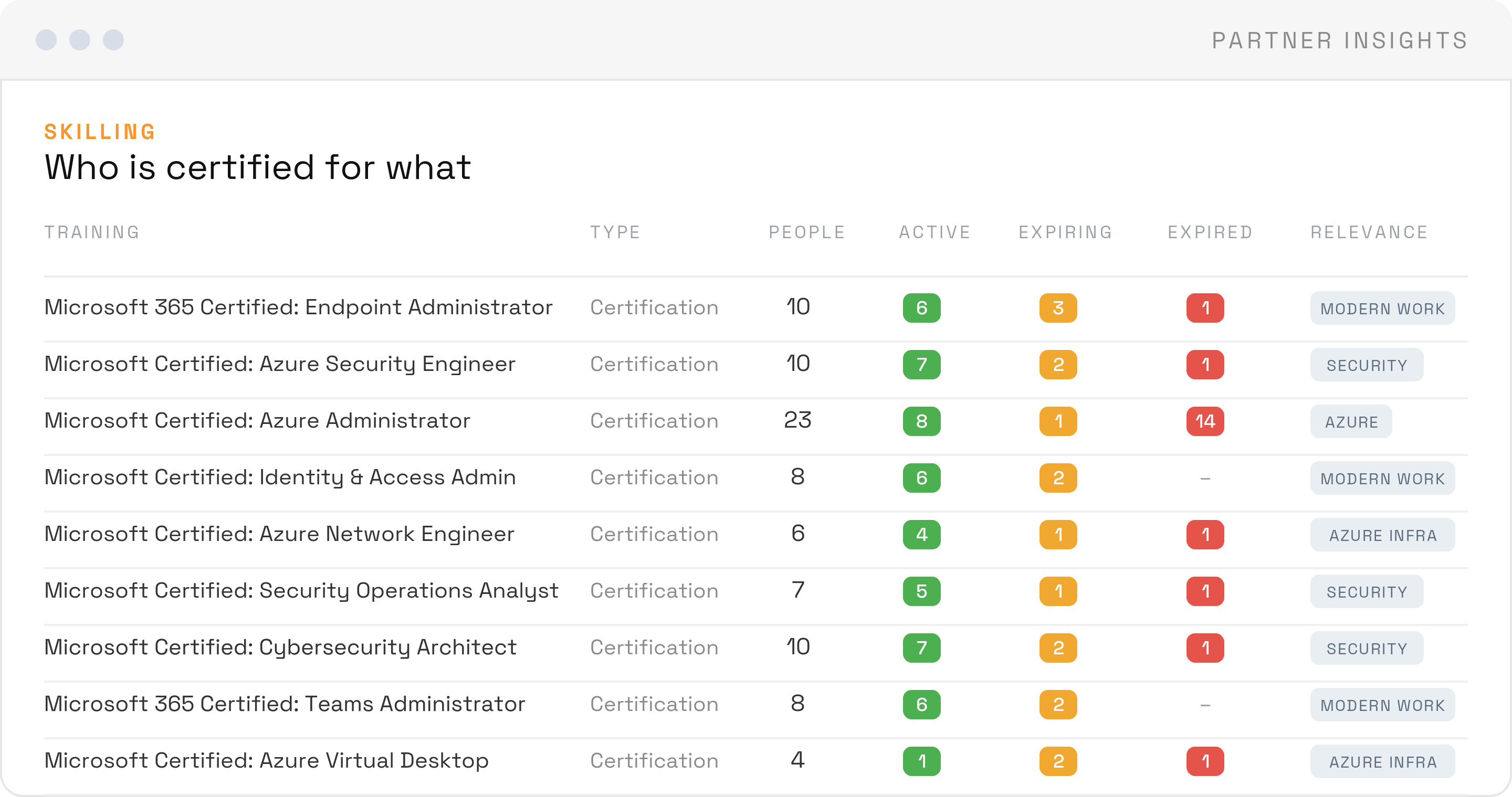
Every training and certification across your team, with active, expiring and expired counts per relevance area.
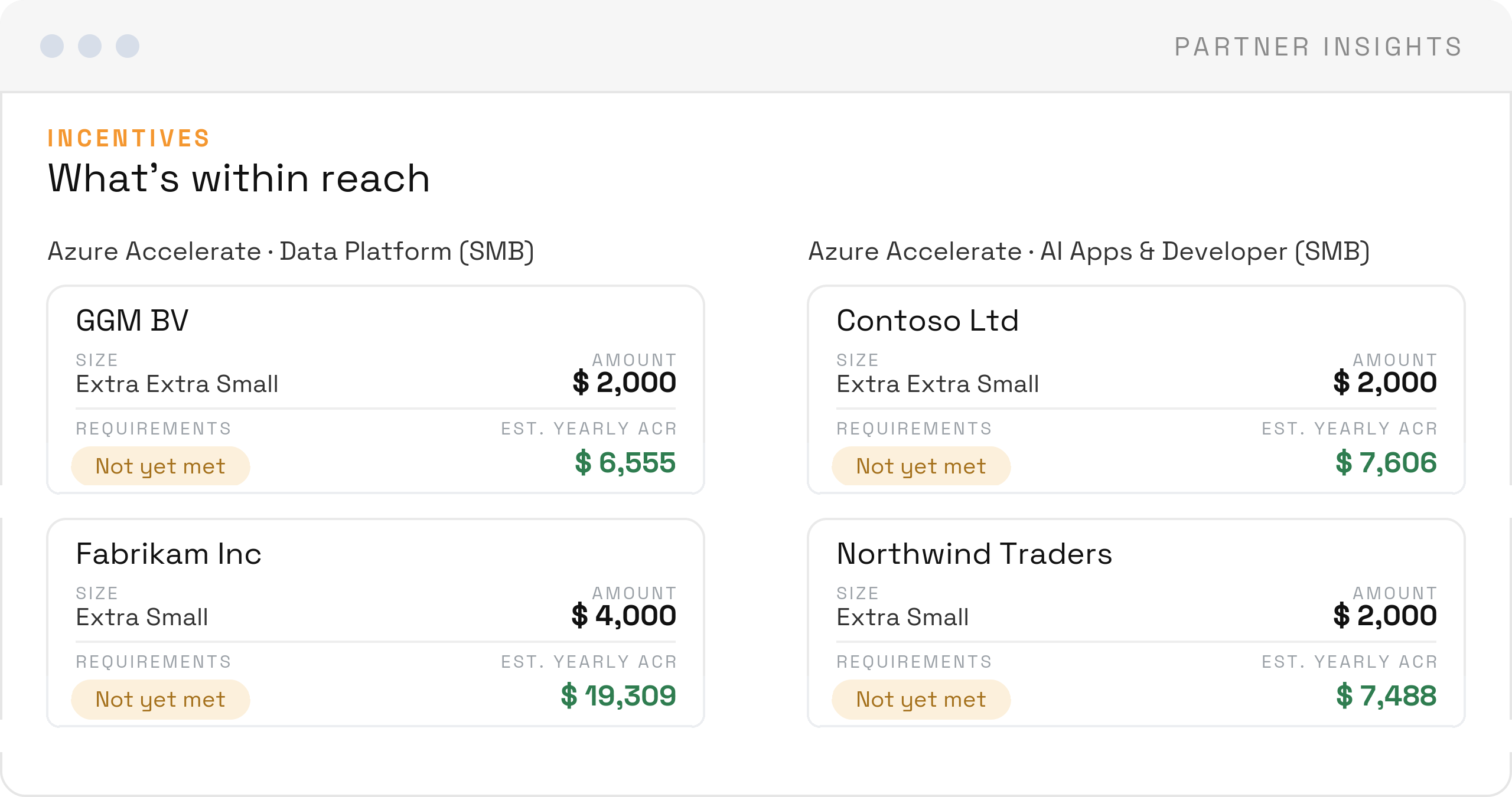
Incentives per customer, what they are worth and which requirements are still open.
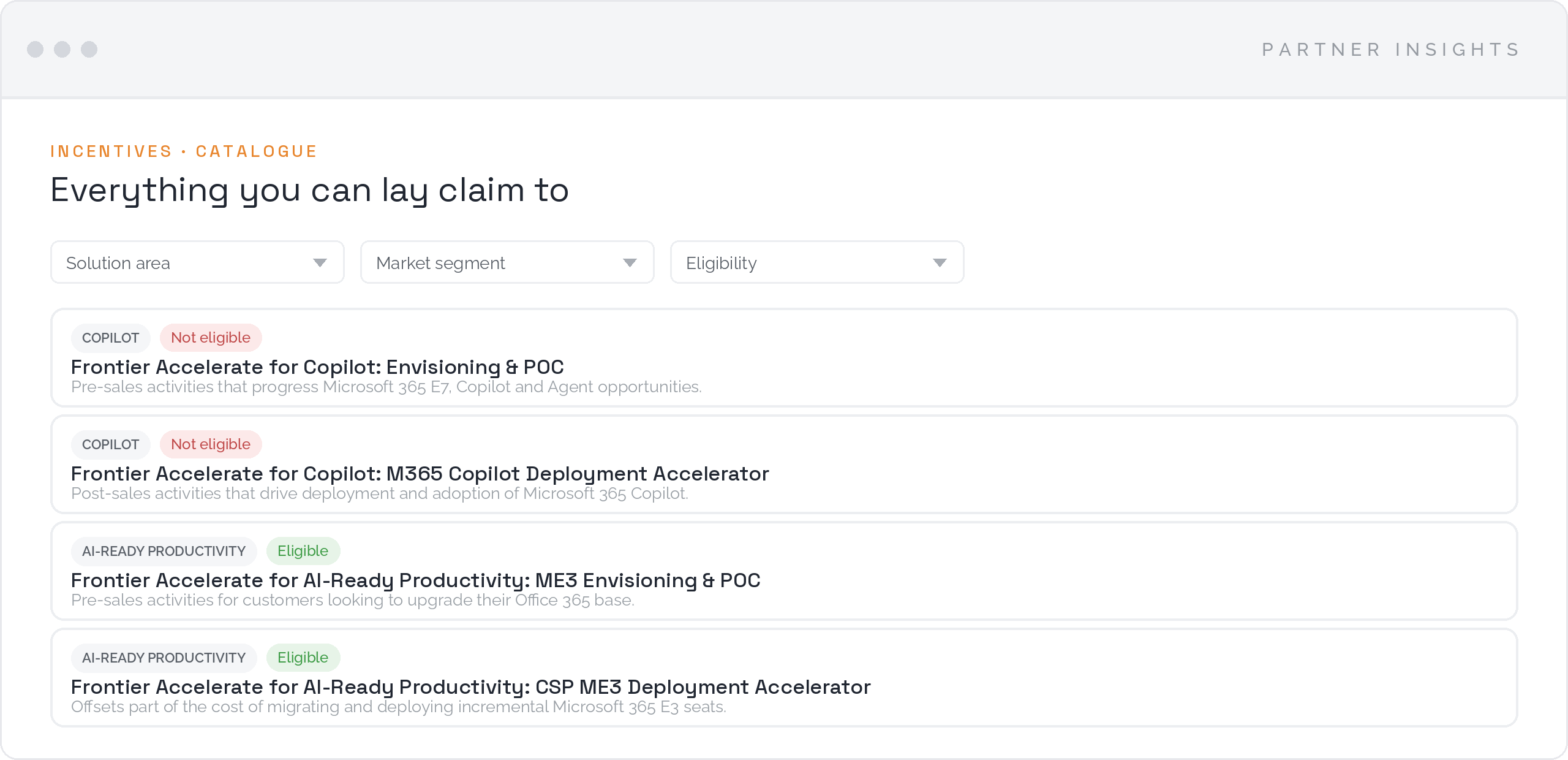
The full incentive catalogue, filtered by solution area, market segment and your own eligibility.
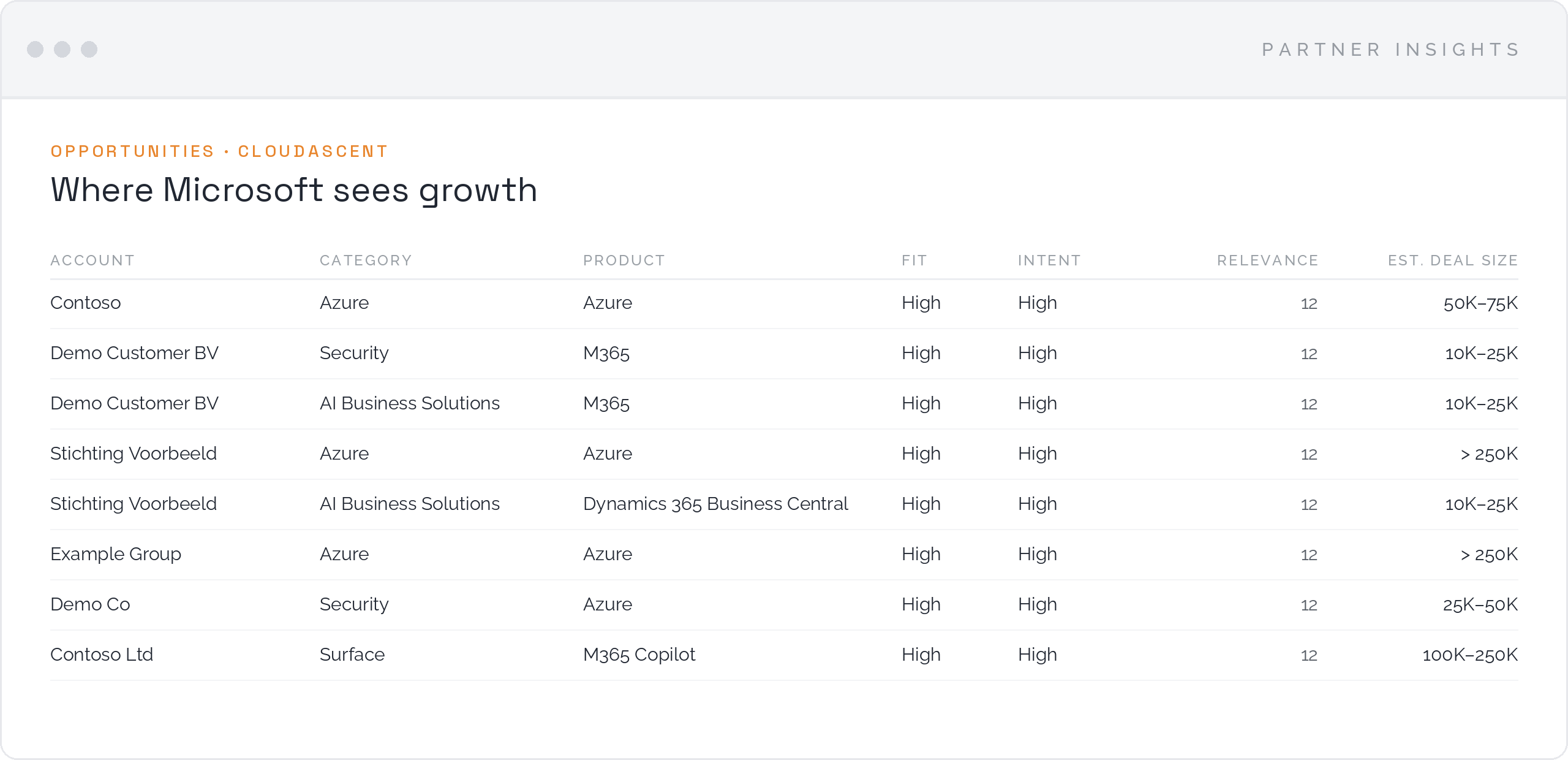
cloudAscent signals per account, ranked by fit, intent and estimated deal size.
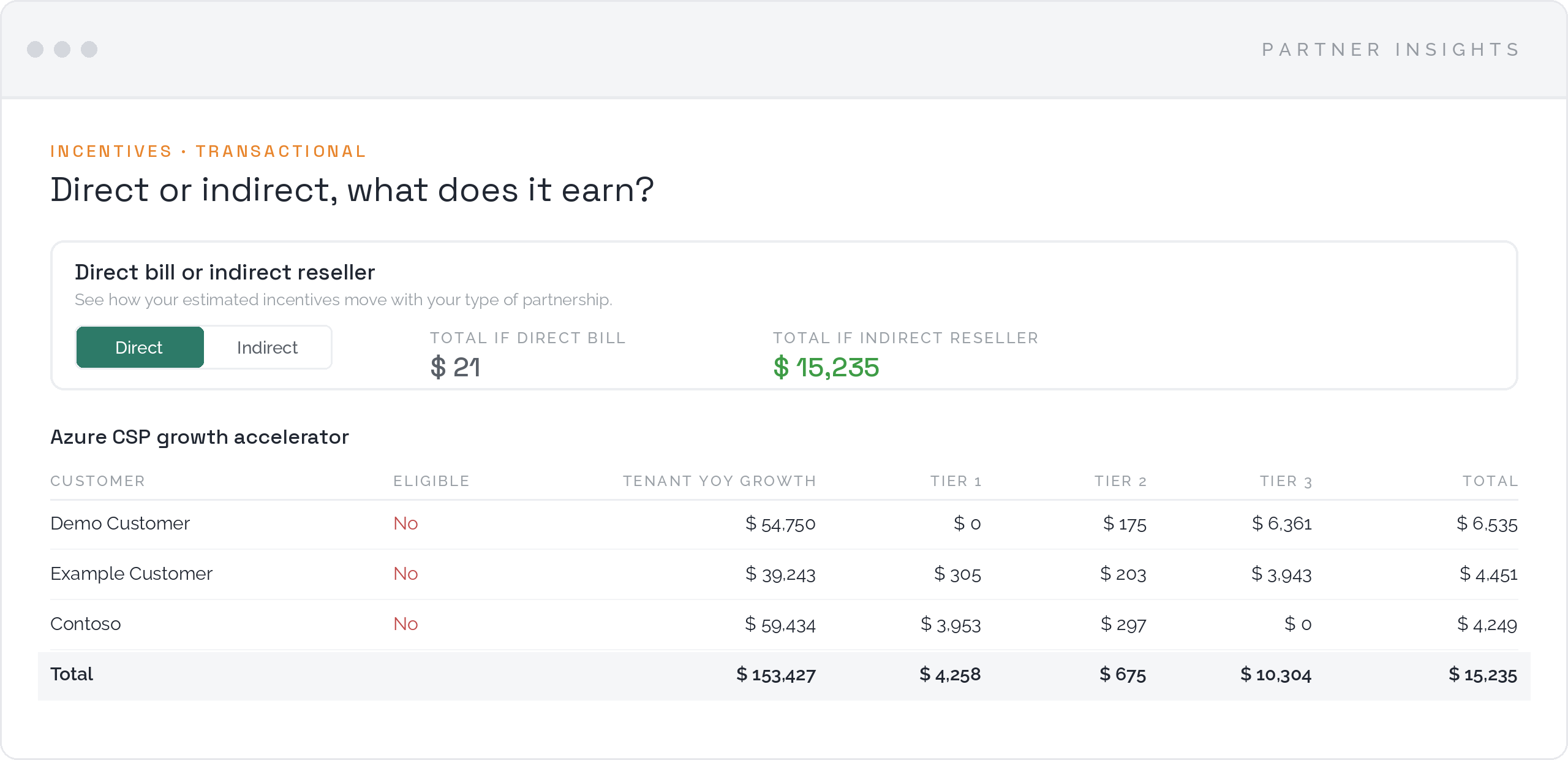
Growth accelerators
Compare your estimated incentives for a direct bill partnership and for an indirect reseller, per customer and per tier. You see what your type of partnership is worth before you decide to change it.
How you start
Connect your Partner Center tenant, grant the right permissions once with MFA and your dashboard fills itself automatically. Everything runs in the cloud, so you are live the same day.
Connect your Partner Center tenant
Grant permissions once with MFA
Your dashboard fills itself automatically
Questions and answers
The rules behind the Microsoft AI Cloud Partner Program change every year. These are the questions MSPs and distributors ask us most, answered as they stand for FY27.
A Solutions Partner designation is Microsoft's proof that your organisation can deliver in a solution area. You earn it through your partner capability score in one of six designation pathways: Data & AI, Infrastructure, Digital & App Innovation, Modern Work, Business Applications and Security. Those pathways roll up into three customer-facing badges: Cloud & AI Platforms, AI Business Solutions and Security. A designation is also the entry ticket for specializations and for several incentive programmes.
Your partner capability score runs to 100 points across three categories. Performance counts net customer adds over the trailing twelve months. Skilling counts the people in your team holding the required intermediate and advanced certifications. Customer success measures usage growth and deployments across your customer base. Every metric has its own threshold and weight, and partial progress earns partial points.
You need at least 70 of the 100 points in that solution area, with every metric above zero. Strong scores on three metrics combined with a zero on the fourth leave you unqualified. Microsoft checks whether you reached that bar on at least one day inside your qualification window, which covers your anniversary month plus the five months before it.
Both tracks measure the same metrics at different thresholds, so partners serving smaller customers can qualify too. For Modern Work and Security, Microsoft scores you on both tracks and keeps the higher result. In the Azure pathways and Business Applications you are classified automatically, based on the customers you serve. Since July 2026, partners with at least 80% of their customer base in the SMB and SMC-C segments qualify for the SMB track in the Azure pathways.
You keep the designation and the badge until your anniversary date. Microsoft tests the requirement at renewal and looks at your whole qualification window instead of a single day, so a temporary dip is survivable. Once you have missed the bar on every day in that window, Partner Center shows the status Renewal at risk and you have to requalify before you can enrol again.
The customer-facing badge goes, and the benefits attached to your membership end with it. Those benefits include the product licences your own team runs on, and they last only as long as your membership, so you either buy them commercially or remove them. Your earning side is affected as well, because Azure incentive programmes require a designation in one of the Cloud & AI Platforms pathways.
Yes, and they are among the most common causes of a sudden drop. Microsoft certifications stay valid for one year and need a free renewal assessment before that date. Skilling points disappear the moment a certification lapses or a certified colleague leaves. When a certification retires, the skilling you already achieved keeps counting for one more year, which gives you time to move people to the replacement exam.
Only customers you are formally associated with. For Azure that means a Partner Admin Link (PAL) or a CSP Tier 1 or Tier 2 relationship. For Microsoft 365 workloads it means a Claiming Partner of Record (CPOR) claim or a CSP relationship. On top of that, each customer has to clear a threshold, such as a minimum of Azure consumed revenue or a minimum number of paid, active licences.
A designation shows breadth in a solution area and is measured automatically from Partner Center data. A specialization shows depth in one technical scenario, asks for specific certifications and a third-party audit, and can be earned only on top of the matching designation. Specializations carry their own benefits, capped per solution area, and several incentive engagements list them as an eligibility requirement.
Performance and customer success metrics refresh around the 20th of each month. Skilling follows within about ten days of someone passing a certification. A newly associated customer can take up to two refresh cycles, so three to four weeks, before it shows up in your score. Those lead times decide how late you can still act before a renewal date.
Partner Center calculates your position as if you were renewing today. Your renewal date can be eleven months away, and certifications expiring in the meantime, a customer moving to another partner or a contract ending stay invisible in today's score. Partner Insights recalculates the same data against your actual renewal date, so the gap surfaces while there is still time to close it.
Most MSPs earn from four sources. CSP incentives on what you transact, paid as rebates and accelerators. Partner earned credit on the Azure you actively manage. Usage incentives claimed through CPOR on Microsoft 365, Security and Business Applications workloads. And engagement-based funding such as Azure Accelerate, which asks for a specialization or Azure Expert MSP status.
Microsoft moved the money from volume to growth on 1 July 2026. The flat core rebate on Microsoft 365 and Dynamics 365 went to zero, and that budget shifted into growth accelerators that reward net new customers, extra seats and premium workloads such as Business Premium, E5, Copilot and Defender. Azure keeps rewarding consumption and growth, with rates tiered by workload. Indirect resellers currently see the richest growth accelerator rate in the channel.
Partner earned credit (PEC) rewards the partner who genuinely manages a customer's Azure environment, typically with 15% of eligible Azure plan consumption. You earn it by holding an eligible role through admin on behalf of, Azure Lighthouse or a Partner Admin Link. Reservations, savings plans, spot virtual machines and marketplace purchases sit outside it. PEC is calculated daily, so access lost on Monday costs you money on Monday.
CPOR is a claim you file to be recognised as the partner behind a Microsoft 365, Security or Business Applications workload, and it needs proof of execution signed off by your customer. PAL links your partner ID to the Azure resources you manage and works without a claim process. Both feed your designation metrics and both unlock incentives, on different product families.
Usually because the proof of execution falls short. Reviewers look for a document with a customer signature, a current date, a clear description of the work you delivered and the exact products you claim. Claims stay under review for up to fourteen business days, customers can decline the association after approval, and you have thirty days to dispute a rejection.
For a growing part of the programme, yes. Azure incentive programmes require a designation in one of the Cloud & AI Platforms pathways, and Azure Accelerate engagements require a specialization or Azure Expert MSP status. That is why a designation lost at renewal hits your P&L twice: the benefits stop and part of the earning stops with them.
Microsoft adjusts these rules monthly, quarterly and at the start of each fiscal year. Partner Insights follows that rhythm, so your own numbers stay current. Ask us about your situation.
Email us for a demo and see your own designation status, risks and incentive opportunities in one overview.
Request a demo